2. Introduction
2.1. What is the Cerbo GX?
The Cerbo GX is a powerful member of the GX product family, an advanced communication centre that monitors and controls energy systems. It features extensive communication interfaces and can be paired with an optional (GX Touch 50 & GX Touch 70) touchscreen for enhanced usability and visual feedback.
GX devices can be placed at the core of any Victron energy installation. They run the Venus OS operating system and ensure seamless communication between all connected components, including inverter/chargers, solar chargers, DC-DC chargers and batteries.
You can monitor and control your system:
Remotely, via the Victron Remote Management (VRM) portal using an internet connection (see Accessing via VRM)
Locally, via:
A web browser (see Accessing the Remote Console via local LAN/WiFi Network)
An Android tablet or phone as a dedicated display (see Android GX WiFi Display)
A Multi-Functional Display (MFD) (see Marine MFD integration by App)
The VictronConnect app over LAN, WiFi, or Bluetooth (where applicable)
The built-in WiFi Access Point
The Remote Console provides a central user interface for system monitoring and configuration, accessible both locally and remotely.
The Cerbo GX also supports VRM: Remote firmware updates and allows remote configuration changes.
Note: This manual refers to the latest firmware version. You can check the current version via the Device menu under Settings → General → Firmware (see the Firmware updates chapter). If your GX device is not connected to the internet, the latest firmware can be downloaded from Victron Professional.
2.2. Manuals for discontinued GX devices
Note
Manuals for GX devices that are no longer in production are available in the old manuals section of the Victron Energy website:
These manuals are no longer updated. This does not mean that the features described in the present manual are unavailable on discontinued GX devices. Most functionality is provided by the Venus OS firmware rather than by the hardware, and is therefore also available on older GX devices, provided the installed firmware version supports the feature and the hardware requirements stated for it are met.
2.3. What's in the box?
Cerbo GX | 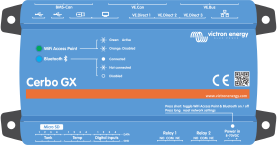 |
Power cable with inline fuse and M8 terminal eyes for battery or DC busbar-attachment. |  |
VE.Can terminators (2 pcs) |  |
Terminal blocks for all the connectors on each side: 3x 4-pin, 2x 3-pin, 1x 2-pin |  |
Please also watch this video for an unboxing and overview of the interfaces: